I Built the Garden Planning App I Couldn't Find Anywhere Else
I'm an avid gardener and a software developer. For years I tried to keep track of everything I grow — what seeds I have, where everything goes, when to start what, how much I actually harvested. I tried spreadsheets. I tried other apps. I tried paper.
None of it stuck. It was too much effort, too disconnected, or just not how my brain works in the garden.
So I built my own.
Giddy Carrot started as a tool for me. It had to solve my actual problems and be genuinely easy to use — I come from software QA, so quality and user experience aren't afterthoughts. When I shared it with other gardeners and heard "there are no apps where you can see your WHOLE garden instead of one bed at a time," and "this is going to save me hours", I knew I wasn't the only one who needed this.
The Layout Planner is where that starts.
The Problem With Every Other Garden Planning Tool
You know the hand drawing. The one you make every spring that starts neat and ends up crumpled, crossed out, and barely readable by August. Or the spreadsheet that technically works but takes forever to update. Or the app that lets you plan one bed at a time, and you never get to envision your whole space in one view.
And then there's the list problem. Your seeds live in a drawer, a spreadsheet, a phone note, or your head. Your garden plan lives somewhere else entirely. You're toggling between the two, guessing at what will fit, making decisions without the information you actually need. Every gardener I've talked to has a version of this story — the thing they meant to grow that never made it onto the plan, the variety that got over-planted because they lost count.
Your Whole Garden. One Place. Finally.
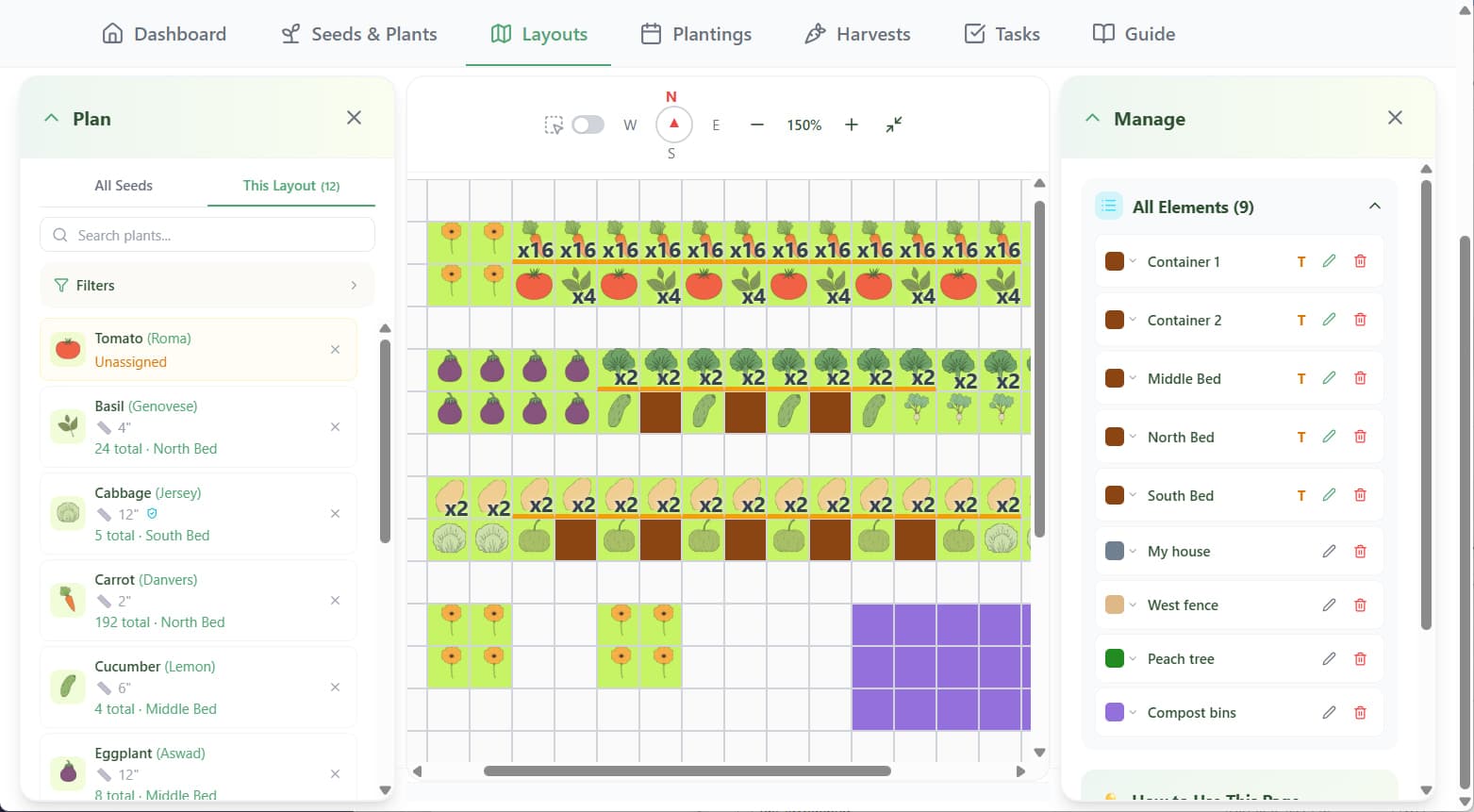
The Layout Planner gives you a grid — your entire outdoor space, mapped out in square feet. Every raised bed, container, grow bag, in-ground area, fence, tree, structure. All of it, exactly how it's actually arranged.
As you add structures — a fence line, a shed, a tree — you start to see your garden the way it actually exists. Which areas get full sun. Where afternoon shade falls. That context changes everything about how you plan what goes where, and you can see it before a single seed goes in the ground.
Building it out is fast. The grid works like a spreadsheet — click and drag to select cells, hit Label to name your bed. Build out your whole space, or just the parts you're working with this season. There's no wrong way to start.
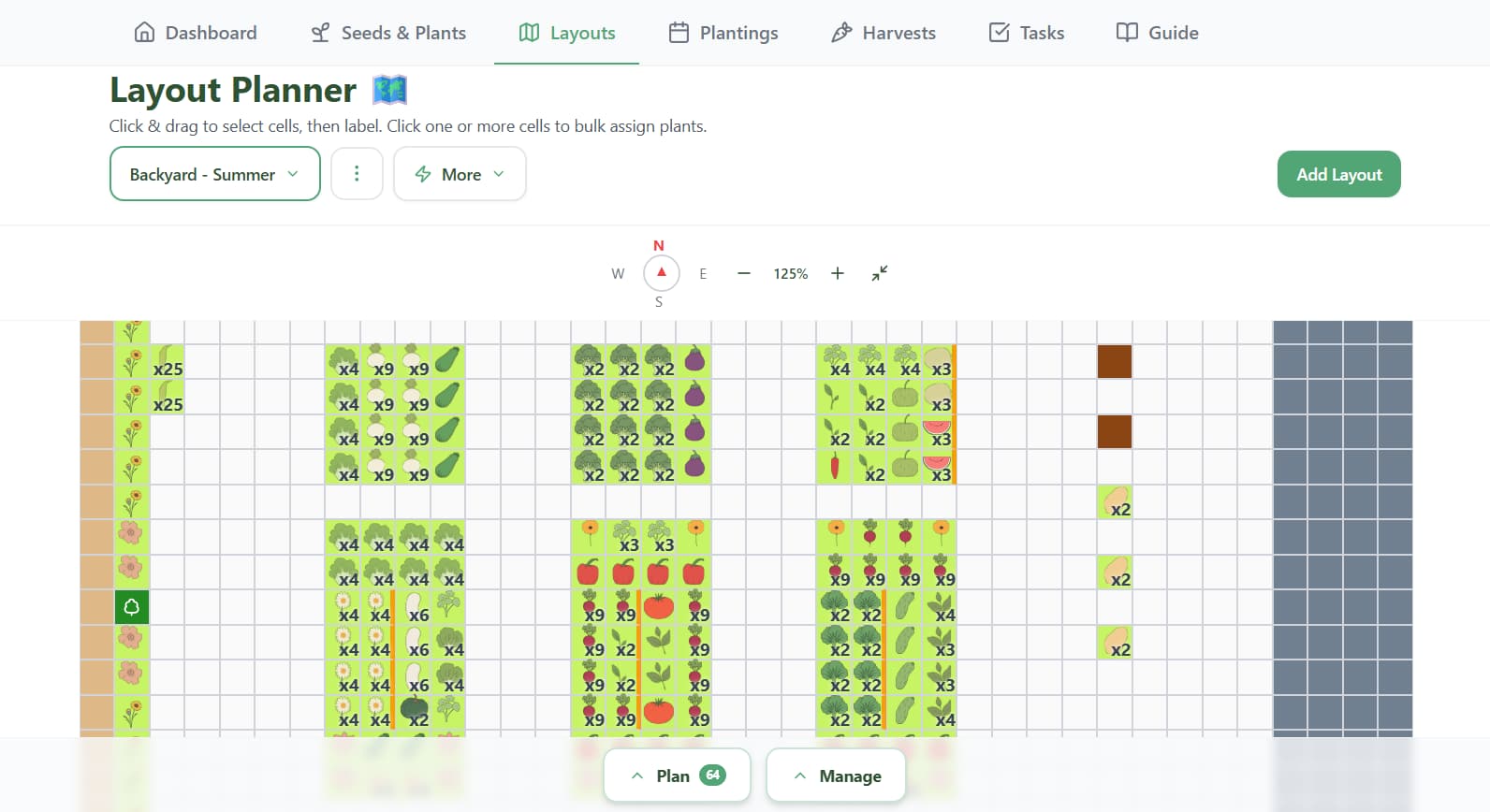
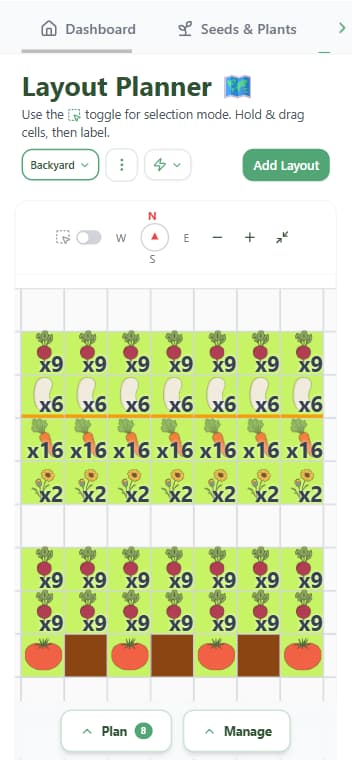
Plan from anywhere. The grid works just as well on your phone as it does on your desktop. Plan from the couch in January, make changes in the garden in April. Your layout goes wherever you do.
The Planning Panel: Your Seeds and Your Plan, Finally in the Same Place
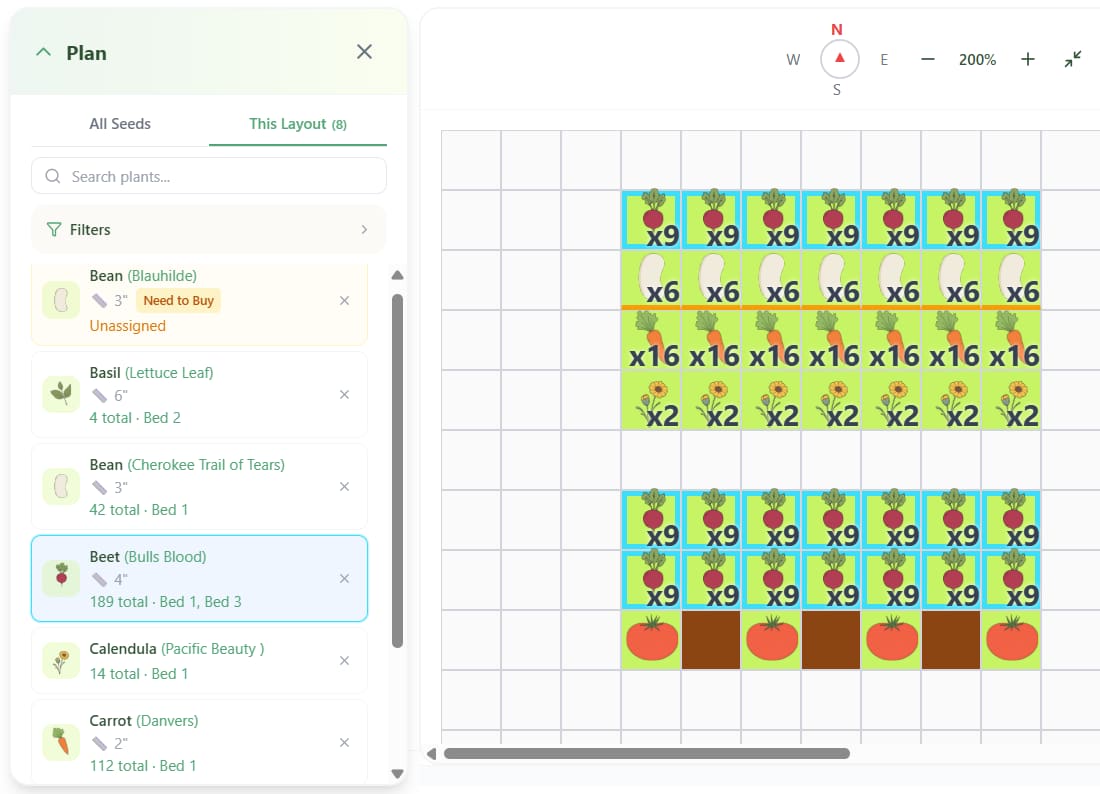
Most garden planning happens in two completely separate places. Your seeds are in a drawer, a spreadsheet, a phone note, or your head. Your garden plan is somewhere else entirely. You're toggling between the two, trying to remember what you have, guessing at how much will fit, and making decisions without the information you actually need.
The Planning Panel closes that gap. Your entire seed inventory is right there while you're planning — filterable by season, frost tolerance, plant category, or spacing, searchable by name. You can see what you own, what will fit where, and what's still unaccounted for as you build out your layout. When something is assigned to a bed, it shows you exactly how many and where. If you haven't made room for something yet, it's sitting there, obvious.
For the first time, the decisions you make while planning are actually informed by what you have and what your space can hold.
The Secret to a Layout That Actually Makes Sense
Planning a garden bed from scratch is one of those things that feels simple until you're actually doing it. So many options, so many ways it could go wrong, so many things you won't realize until midsummer when the cucumbers have eaten half the bed.
When you know where your vertical structures are first, the rest of the bed reveals itself. Big climbers anchor the space. Shade patterns become obvious. Smaller plants find their spots naturally. Planning gets easier — you're filling in around a framework that's already there.
Download Your Free Vegetable Planting Guide
Get instant access to planting data for 65 vegetables, herbs, and flowers — spacing, timing, sowing depth, and start method for every crop.
We respect your inbox. Unsubscribe anytime.
Assigning Plants Takes Minutes, Not Hours
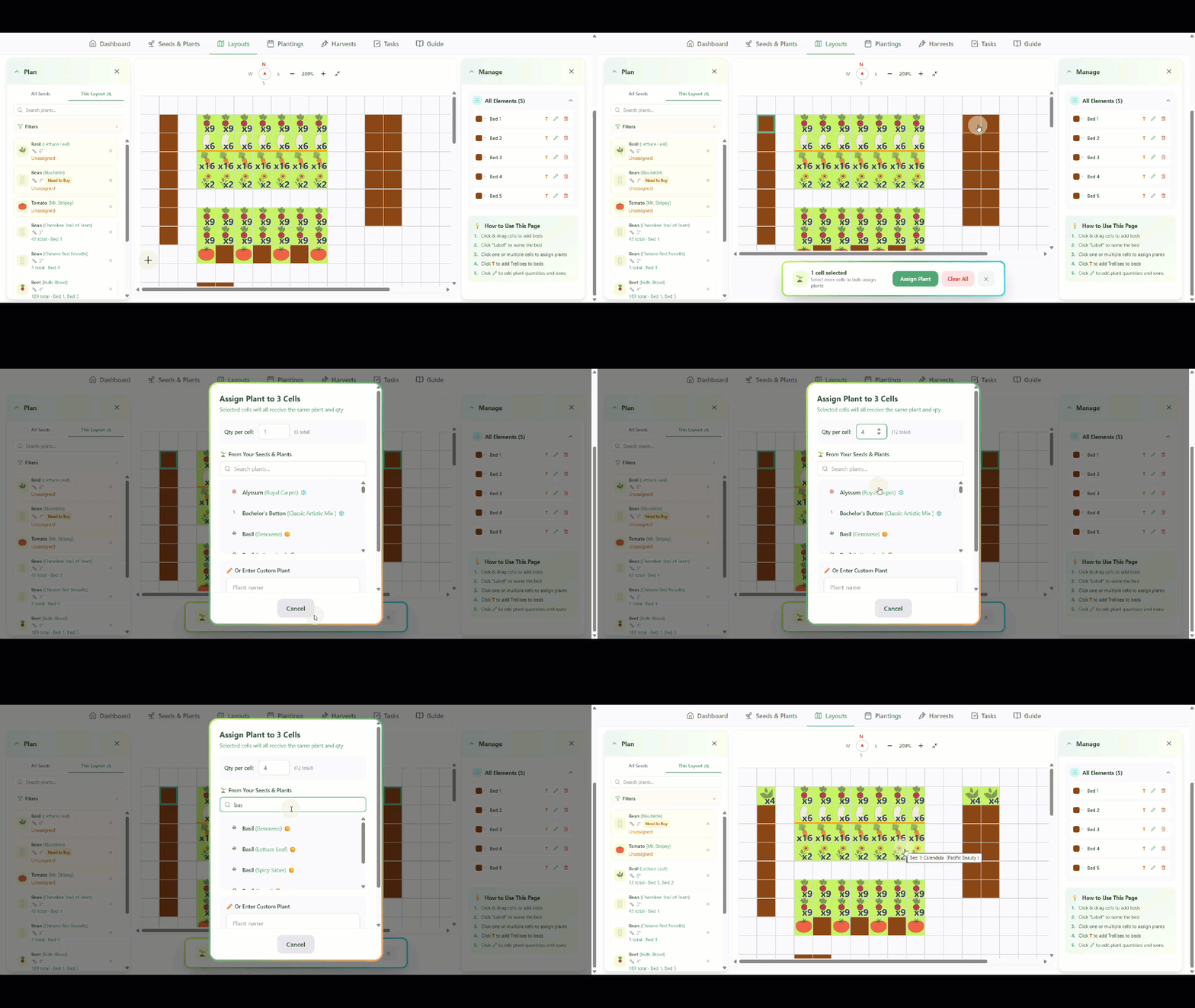
Select one cell or a dozen — across one bed or several — and assign a plant from your Seeds & Plants inventory in a single step. Planting the same herb in four different spots? Select all four cells, assign once. Done.
Step back and you can read your entire garden at a glance: what's going where, what's next to what, whether it actually makes sense before anything's in the ground.
Rearranging costs nothing here. Move things around, try different combinations, change your mind three times. That's the whole point of planning digitally.
Then the App Does Something Kind of Incredible
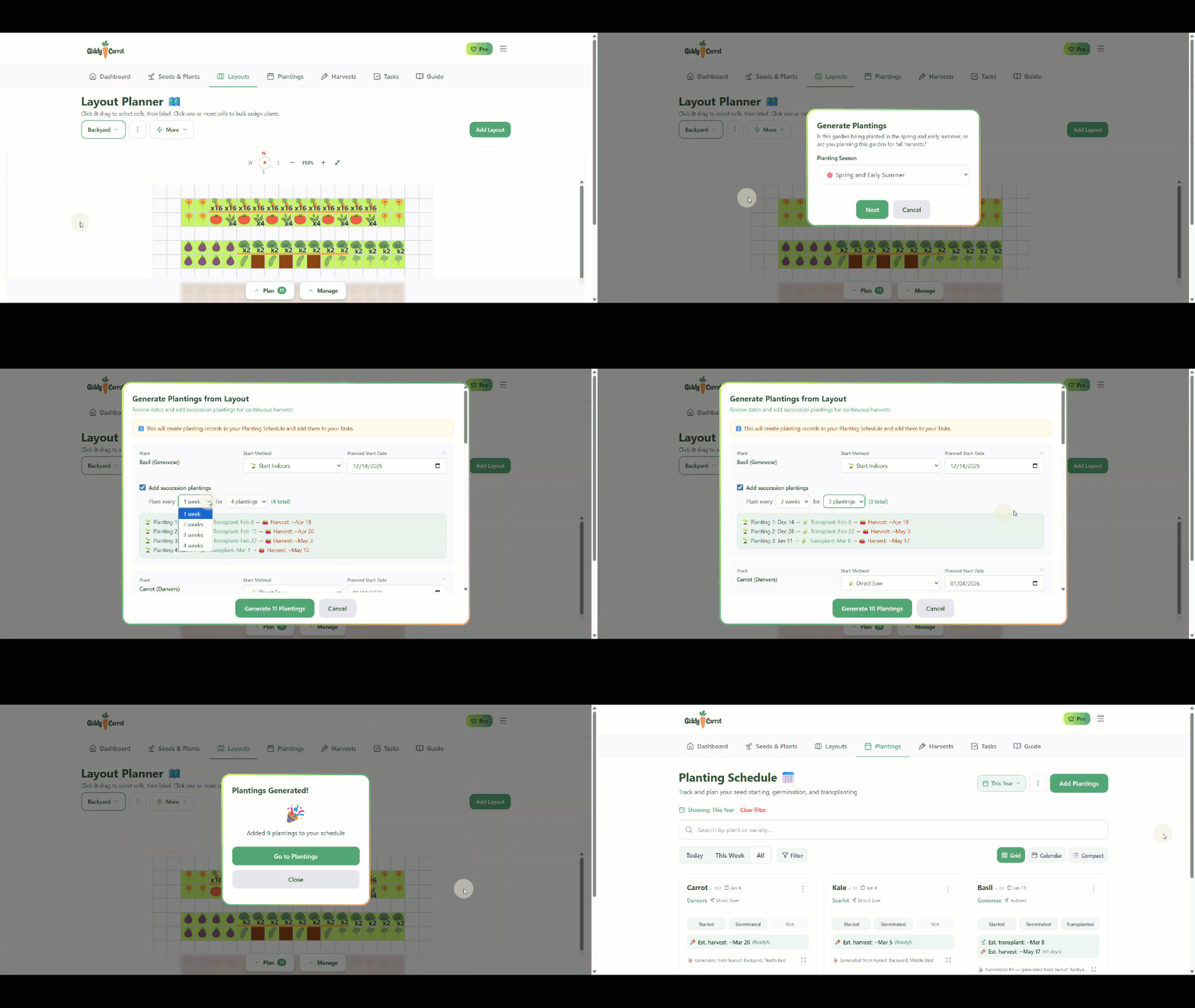
Once your layout is set and your plants are assigned, Pro users can hit Generate Plantings from Layout — and watch the app build your entire planting schedule in seconds.
Every plant. Every start date, transplant date, and estimated harvest date — calculated automatically based on your frost dates and your specific seeds. No math. No backward timeline counting. No cross-referencing seed packets wondering if you should have started those tomatoes two weeks ago.
Everything lands on your Planting Schedule and in your Tasks. Enable email notifications and you get a reminder when each date arrives. One user told me it was going to save her hours. For a large garden, that's not an exaggeration — it takes an afternoon to plan manually. It takes seconds here.
A Plan That Grows With You
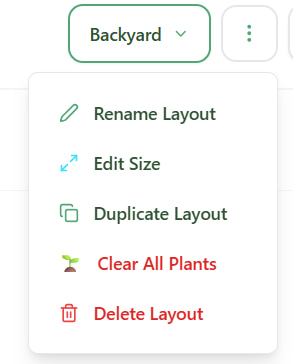
Your layout isn't just for this season. Duplicate it for next year and swap out plant assignments — your bed structure stays intact. Rename layouts to keep a history: 2024 Backyard, 2025 Backyard, 2026 Backyard. Build separate layouts for spring, summer, and fall if you want to plan succession visually. Clear plant assignments without touching your beds when you're ready for a fresh start.
Your garden changes every year. Your plan should be able to keep up.
I built Giddy Carrot because I couldn't find what I needed anywhere else. If you've ever stood in your garden in May realizing you forgot something you actually wanted to grow — or tried to plan your garden in a spreadsheet and felt like there had to be a better way — there is.
The Layout Planner is free to try. One layout on the free plan, unlimited on Pro. Pro also unlocks multiple seasonal layouts and Generate Plantings from Layout.
Related Articles
Why Your Vegetable Varieties Matter More Than You Think
Choosing the wrong tomato variety cost me two seasons of early disease. One onion mistake meant no bulbs — ever. Here's what I learned about matching varieties to your climate.
Companion Planting: What the Science Actually Says (And What You Can Stop Worrying About)
Most companion planting lists were never scientifically tested. Here's what research actually supports — and why one simple change made the biggest difference in my garden.
How to Plan a Productive Vegetable Garden (Step-by-Step)
Learn how to plan a vegetable garden that produces continuous harvests all season. Step-by-step guide covering layout, succession planting, and making the most of your space.